Product model: one World workspace per project
Everett starts with a World workspace
A World is the persistent workspace that keeps one software project's folders, terminals, agents, Web context, Board, and local state together.
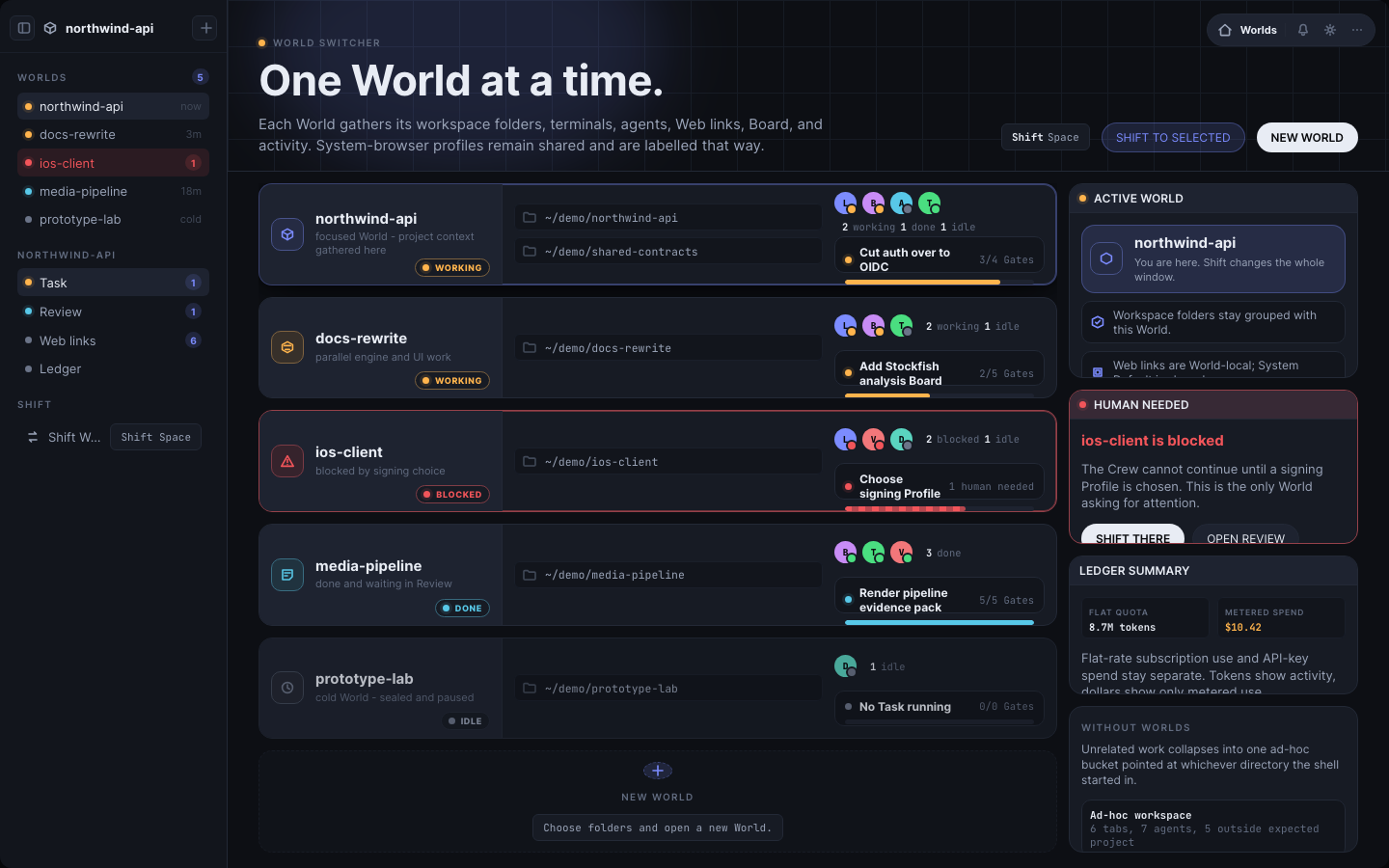
Everett begins with a simple product decision: a software project needs a workspace that is larger than a folder, a terminal tab, an agent session, or a browser window.
It needs a World workspace.
A World is the persistent place where one software project keeps the surfaces and state that belong together. Workspace folders, terminals, coding agents, Web context, notes, drawings, launch preferences, and local state all have the same project owner.
That ownership is the product spine. Everett is not an agent dashboard with a project label added later. It is not a terminal multiplexer with a larger canvas around it. It is a project workspace whose internal surfaces can include terminals and agents.
A project is more than a directory
A source folder is important, but it does not contain the full working reality of a project.
The project also has running processes, terminal history, agent conversations, documentation, local servers, browser tabs, design references, notes, diagrams, and decisions in progress. Those pieces often spread across applications and remain open long after the original folder was selected.
When the user returns, the real question is not only, “Where is the repository?” It is, “Where is the state of this project, and can I resume it without reconstructing the whole working setup?”
Everett answers with a World. The World names the project, supplies its workspace, restores its visible context, and gives new work a known place to begin.
What a World workspace owns
A World owns the workspace folders that define the project context. New terminals and agents begin from that context rather than inheriting whatever directory happened to be active somewhere else.
It owns a Web collection: the URLs, tab choices, home setting, and launch preferences that belong with the project. The browser target can still be shared or separated, but the collection has a clear World owner.
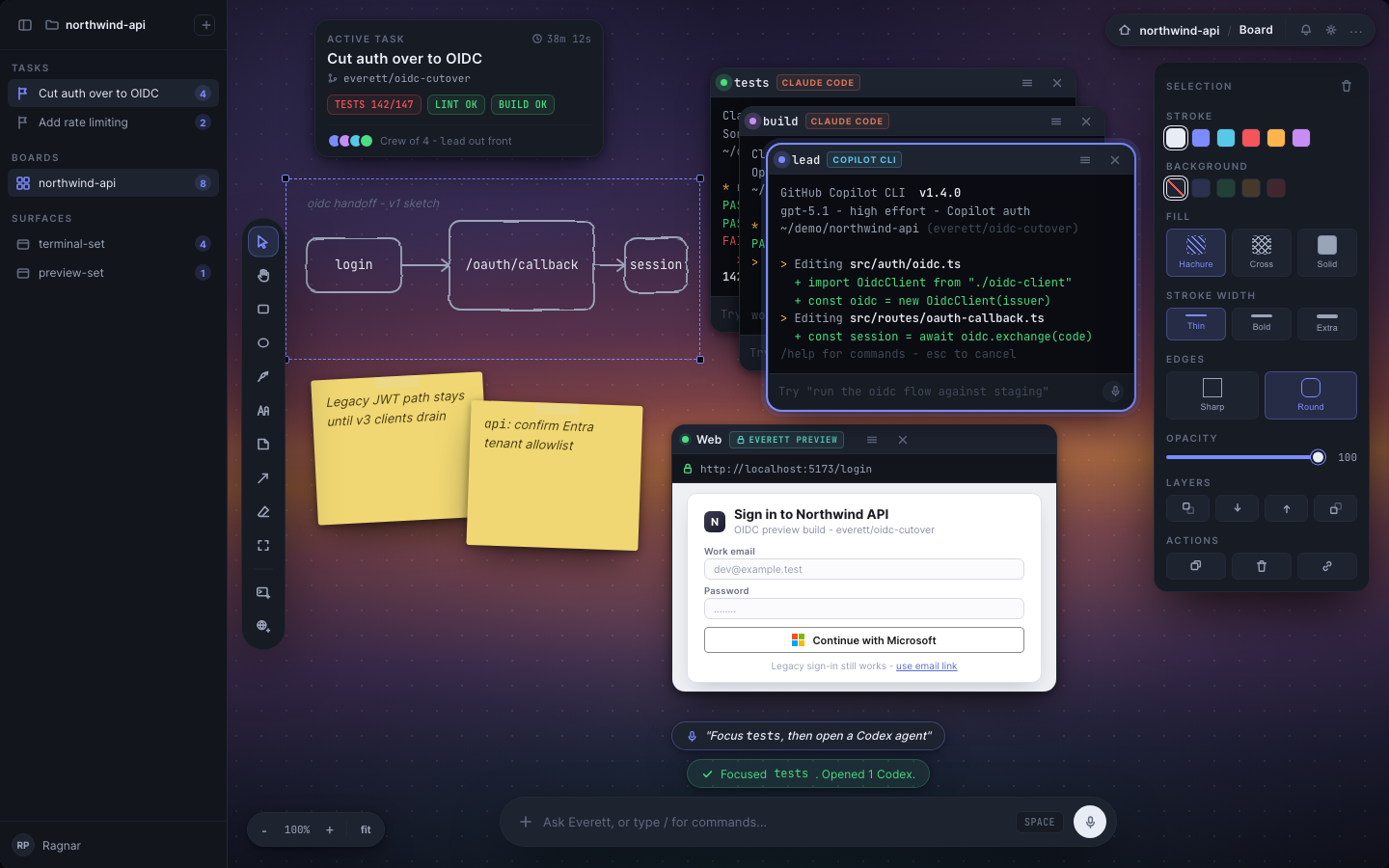
It owns a persistent Board where terminals, notes, drawings, and Web cards stay spatially arranged. The Board is not a separate whiteboard product. It is a visual layer of the same World workspace.
It also owns selected local state, including shell history, caches, temporary files, git configuration, and a port range. Those boundaries help keep project work relevant and legible even when the host operating system remains shared.
Multiple Worlds can stay active
Everett is designed for people who work across several software projects at the same time.
A Shift moves the Everett window from one World to another. The destination World restores its Board, terminals, Web collection, and current context. The other Worlds do not have to be dismantled just because they are not visible.
This is the practical value of the many-worlds metaphor. Several project realities can continue alongside one another, but each remains its own workspace. Moving between them should feel like changing the active project reality, not adding another tab to an already mixed pile.
The user can ask, “Which World owns this work?” That answer connects the project name, workspace, terminals, agents, Web context, and Board.
Why the name Everett
Everett is named for Hugh Everett III (1930-1982), the physicist who proposed the many-worlds interpretation of quantum mechanics in 1957.
The product uses that history as an organizing metaphor. Each software project becomes its own World. Different Worlds can remain active at the same time. Shifting the visible World changes the active working context while the others keep their own state.
The name is not a claim that software projects behave like quantum systems. It is a concise way to express the experience Everett is building: many distinct project Worlds, each persistent, each internally coherent, and each ready when the user returns.
Why not a terminal or agent workspace
A terminal runtime groups terminals, panes, tabs, and processes. That is valuable infrastructure, but its top-level object is still terminal-shaped.
An agent dashboard groups agent sessions. That helps with orchestration, but it makes the agent the organizing object. A project can contain agents, yet it also contains files, browsers, local services, notes, drawings, and human decisions.
Everett groups the project. Terminals and agents live inside the World workspace because they are part of the project, not because they define the project.
The design direction is to integrate Herdr for terminal runtime depth rather than rebuild its panes, persistence, agent detection, and worktree handling. That integration does not ship in the installed application today. The current app runs real PTYs itself.
The honest boundary today
Some separation is real now.
Everett gives each World its own workspace folder and separates several terminal-side state paths, including shell history, caches, temporary files, git configuration, and a port range. Everett Preview also uses a browser storage partition per World.
Other boundaries remain shared.
The host filesystem is still reachable. Host dotfiles and credentials may be reachable. Coding-agent command-line tools can keep their own login and session state under the user’s home directory. External browsers opened with a system profile share cookies, logins, bookmarks, and history across Worlds.
That makes the current World a boundary for relevance, not for secrets.
It is safe to say that Everett organizes and restores project context. It is not safe to say that one World is a security sandbox against another. Full Mount enforcement is design direction, not shipping behavior.
The process boundary also has a narrow edge. Everett strongly reaps the process trees it starts, including ordinary background jobs, but a fully detached process with no remaining socket can escape discovery. The product should state that limit rather than hide it behind the general idea of cleanup.
The World workspace is the product
If Worlds work, a user should be able to tell which project owns a terminal, agent, Web collection, note, or Board object. New work should begin in the right workspace. Returning to a project should restore its relevant state. Shifting Worlds should replace the visible project context rather than add more fragments to a shared pile.
The World workspace is the product spine because it connects the name on the screen to the work that is actually happening. Everything else, from Web to Board to future Mount enforcement, is valuable insofar as it helps one project remain together, understandable, and ready to resume.
Source basis
- Grounded in Everett's current brand decisions, World requirements, and implemented product truth.
- Current boundary statements reflect the implemented macOS application and its isolation audit, not the stronger future Mount design.